From the keys on the desk to the next service call.
VirAuto runs a car repair shop: repair orders, a tablet for the mechanics and their time, parts and stock, estimates, appointments, customers and their cars, tyre storage, payments and the calls to make. It runs on one PC in your workshop, and your data stays there.
A car's day in VirAuto
The same seven steps for every car. Each one is done once, where the work happens, and everyone else sees it.
- Booked inan appointment, in a bay, with a mechanic
- Checked inplate, mileage, key tag, what the customer says
- Jobs and partsat book time, given to the mechanics
- On the tableteach job timed, parts off the shelf
- Readyon Home: call the customer
- Collectedpaid, priced summary printed
- Remindersnext service, registration, tyres
Screens from VirAuto itself
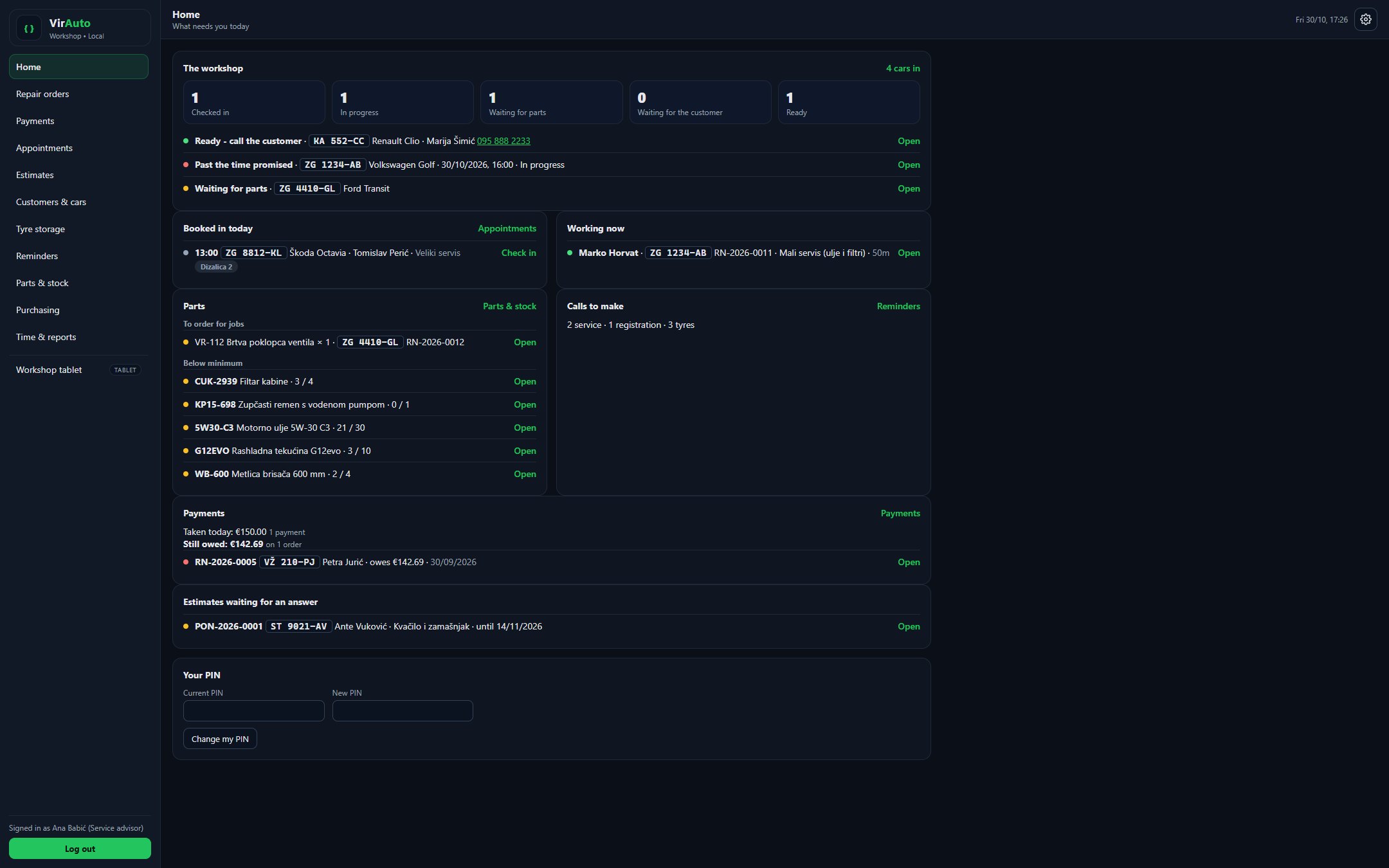
Not mock-ups: these are VirAuto's own pages, running a demo workshop. Pick a screen — click it to see it full size.
Every name, plate and figure in these screens is made up.
The whole workshop, front desk to tablet
Each part is connected to the others: a part fitted on the tablet comes off the shelf, an accepted estimate becomes the repair order, a collected car goes on the list for its next service.
Repair orders
Every car on one board, by where it's up to. Check a car in with the plate, mileage, key tag and promised time; the customer signs the printed work order.
The workshop tablet
Mechanics sign in with a PIN, start and stop each job, take parts off the shelf, write what they found and say when the car is ready. They never see a price.
Book time and real time
Labour is charged at book time, with the time really worked beside it — red when it runs over. One click charges the actual time instead.
Parts and purchasing
Stock by shelf, litres of oil as well as pieces, LOW below the minimum. Draft orders for low stock, one per supplier, and receive them onto the shelf.
Estimates
Work, parts and anything else, priced line by line and printed for the customer. Customer said yes puts the lines onto the repair order — nothing typed twice.
Appointments
The week, day by day, by bay and mechanic. The car is here opens the repair order with the complaint already filled in.
Customers and cars
Find them by name, phone, plate or VIN. Every car's history on one page: mileage, next service, registration and its tyres.
Tyre storage
The tyre hotel: whose tyres are on which shelf, the tread on each wheel, the seasonal swap in one step, and a tag with a QR code.
Reminders
Who to call and why: the next service, the registration, the tyre change. The list can come by email at 07:30 — only when something is new.
Payments
Take a payment on the order — cash, card or bank transfer, a deposit or the rest — see what's still owed, and count the drawer at the end of the day.
Time and reports
Who is in and what they're on. Per person: time clocked in, time on jobs, book hours done and efficiency — exported for payroll.
Looks after itself
Starts with Windows before anyone signs in, starts again if it ever stops, and makes a checked backup every night. Careful updates that put everything back if a step fails.
Four roles
- Admin
- Everything, including staff and settings.
- Service advisor
- Customers and cars, appointments, estimates, repair orders, payments, tyres, reminders, time and reports.
- Parts
- The catalogue, stock, suppliers and purchase orders; the parts on repair orders.
- Mechanic
- The workshop tablet only. Never sees a price.
What VirAuto doesn't do
- Fiscal invoices. VirAuto records payments and prints a priced summary; the invoice is made in your own invoicing program.
- Text messages to customers. The call list is for phoning, and it can be exported.
- Online booking by customers. Appointments are made by the front desk.
- Parts catalogue lookups. You keep your own catalogue of the parts you stock.
Try VirAuto free for 30 days
Download it, install it on the workshop's PC and use all of it for 30 days. No card and no form to fill in — the trial starts by itself the first time VirAuto connects.
VirAuto for Windows
ZIP · English and Croatian ·SHA-256, to check the file:
What you need
- ✓One Windows 10 or 11 PC that stays on — a desktop or mini PC, not a laptop that goes home in the evening.
- ✓Internet while installing — it downloads about 100 MB of its parts, and the trial starts. After that only now and then: a licence lasts weeks.
- ✓A second disk for the backups — a USB drive left plugged in will do.
- ✓Tablets and office PCs on the same network, with any browser. Nothing is installed on them.
After the 30 days
Subscribe and nothing changes. If you don't, VirAuto becomes read-only: everything can still be looked at, printed and exported, but nothing new can be added. Nothing is ever deleted — subscribing brings it all back as it was.
Rather have us install it?
We can install it for you, on site or remotely, and set it up with your workshop's details, staff and bays. Call or write.
Contact usHow to install it
About ten minutes on the PC that will run VirAuto, signed in as the Windows account it will run as. A window in English or Croatian takes you through it.
- Download and unzipSave the ZIP on the workshop's PC. Right-click it, Properties, tick Unblock if it's there and press OK — then right-click it again, Extract All… Not into OneDrive or the Desktop if they're synced.
- Double-click Install VirAutoIn the unzipped folder. If Windows asks whether to run it, choose Run (on a blue “Windows protected your PC” screen: More info, Run anyway). It checks the PC and offers to install Node.js if it's missing.
- Answer a few questionsWhere VirAuto goes (C:\VirAuto), the workshop's name and details, the admin's PIN (6 digits or more), where the nightly backups go, and — if you want it — the morning email.
- Say Yes onceWindows asks once for administrator permission, so VirAuto starts with Windows before anyone signs in. Then it installs its parts — a few minutes.
- The trial startsThe last page shows the addresses for the tablets and office PCs. VirAuto connects and the 30-day trial begins; Settings → Subscription shows the days left.
- Set up the workshopSign in as admin with your PIN. Home's Finish setting up list takes you through the settings, your staff and their PINs, shelves, suppliers and parts.
Every step, the checks afterwards, tablets, backups, updates and what to do when something's wrong are in the installation manual.
Everything written down
The same manuals that come with VirAuto, as PDFs to read or print — in English and Croatian.
Installation manual
Installing, checking it works, tablets, backups, updates · 14 pages · 0.4 MB
Download ↓User manual
Every page and every role, in the order you'll use them · 14 pages · 0.4 MB
Download ↓Priručnik za instalaciju
Croatian · installing, tablets, backups, updates · 14 pages · 0.4 MB
Download ↓Korisnički priručnik
Croatian · every page and every role · 14 pages · 0.4 MB
Download ↓Frequently asked
Does VirAuto need the internet?
Not to work. It runs on your workshop's own network, and the tablets keep working without internet. It connects now and then to renew its licence — a licence lasts weeks, so days without internet change nothing — and to send the morning email, if you set one up.
Where is our data?
On the workshop's PC, and in the backups it makes every night. When VirAuto renews its licence it sends us the install's id, its version, the licence's state and the workshop's name, email and phone from its Settings — never anything about your customers, cars, repair orders, money or staff.
What happens after the 30 days?
Subscribe and nothing changes. If you don't, VirAuto becomes read-only: you can still look at, search, print and export everything, but not add anything new. Nothing is deleted, and subscribing brings it all back.
Does it issue fiscal invoices?
No. VirAuto records what the customer paid — cash, card or bank transfer — and prints a priced summary of the work. The fiscal invoice is made in your own invoicing program, as today.
Does it work on a Mac or an iPad?
The server is one Windows 10 or 11 PC in the workshop. Everything else — office computers including Macs, iPads, Android tablets and phones — just opens it in a browser.
How are updates installed?
An update waits until nobody is clocked in, makes a backup first, checks that the new version starts, and puts everything back if it doesn't.
See it on a car from your own workshop.
Try it yourself for 30 days, or tell us how a car goes through your workshop today and we'll show you the same car in VirAuto.